Using Claude for Workflow Integrations: Beyond the Chat Window
The leverage in 2026 isn't whether your team uses Claude. It's whether Claude is integrated into the workflows themselves, where the work actually moves.
Justin Hinote
Partner & AI Business Consultant
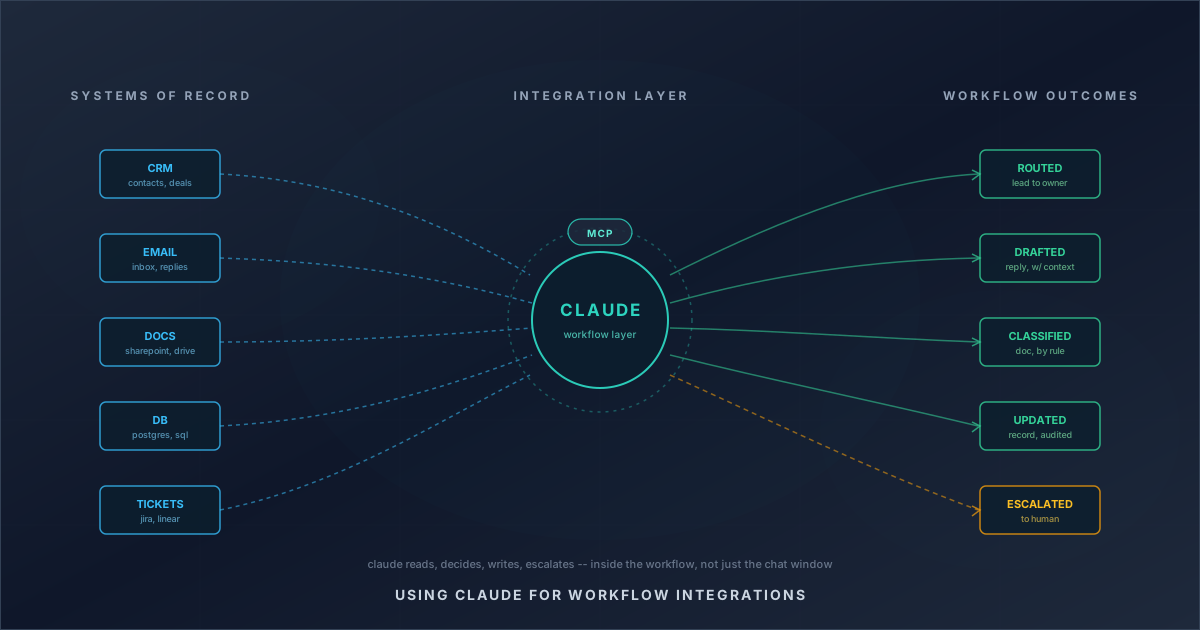
When a leadership team says "we use Claude," they almost always mean one of two things — and the gap between them is where 2026 separates real value from theater.
The first version is individual productivity. People paste prompts, draft emails, summarize documents, and ask Claude questions. The second version is workflow integration. Claude reads from systems of record, makes decisions inside the work, writes back, and escalates when something falls outside the rules. The first one is a tool sitting next to the work. The second one is part of the work.
Most teams start with the first. The teams getting measurable lift in 2026 are moving deliberately to the second.
What MIT Is Actually Saying About 2026
MIT Sloan's coverage of where AI and work are heading in 2026 is unusually direct about this gap. Their framing: most organizations have so far approached generative AI as an individual-level productivity tool. Workers use it to do their own job faster. What's relatively rare — and where the actual enterprise value lives — is applying generative AI to the workflow itself.
Their related research on how AI is reshaping workflows goes further. The biggest impact does not come from making one task faster. It comes from changing how tasks are sequenced, grouped, and handed off — including the handoffs between humans and machines. That is a workflow design question, not a tool selection question.
MIT's action items for AI decision makers in 2026 frame the year as the maturation point. The pilot phase is over. Companies that stay in productivity-tool mode keep getting marginal speed gains. Companies that move to workflow integration start seeing real operating leverage.
That is the practical version of the question every operator is now asking: where does Claude actually go inside the work, not next to it?
Why Claude, Specifically
Ben Thompson's recent Stratechery coverage is useful here, partly because he is skeptical by default and partly because he has watched the platform layer for two decades.
In Agents Over Bubbles, Thompson notes the inflection — Claude releases starting with Opus 4.5 in late 2025 finally crossed the line where agents could complete real, multi-hour tasks correctly, not just demo well. That sounds incremental until you operate inside a workflow. The difference between a model that handles 70 percent of a multi-step process and one that handles 95 percent is the difference between having to babysit the agent and being able to actually delegate to it.
Thompson's broader analysis of integration and the enterprise points at a more strategic reason Claude shows up in serious enterprise stacks. Anthropic deliberately positioned the company toward enterprise, where buyers will pay for software that makes employees more productive — and even more for software that lets the company do more work without proportionally adding people. That is not hype. That is the actual operating economics of mid-market and up.
The corollary matters: Claude is being shipped, sold, and supported as a workflow surface, not just a chat assistant. Treating it like a chat window leaves most of what you paid for on the table.
How Integration Actually Works
The mechanism that makes "Claude in the workflow" feasible, instead of a long custom integration project, is the Model Context Protocol — Anthropic's open standard for connecting AI assistants to the systems where data and tools live.
The practical effect is straightforward. Instead of every AI integration being a one-off custom build, MCP gives Claude a standard way to read from and act on Google Drive, Slack, GitHub, Postgres, Jira, Confluence, your CRM, your ticketing system, your data warehouse, and on. Atlassian shipped a remote MCP server so Claude can answer Jira and Confluence questions inside the work, not as an export-and-paste exercise. Block adopted MCP to securely connect their own AI systems to internal data without rebuilding plumbing for every use case.
The reason this matters operationally: integration cost was the gating factor. When every workflow integration was a custom engineering project, only the largest and most predictable workflows justified the build. With MCP, the cost of putting Claude inside a real workflow drops to where you can do it for the second-tier workflows that actually represent most of the operational drag in a mid-market business. That changes which problems are worth solving with AI, which is exactly what MIT is pointing at.
This is the layer where agent systems start to make sense for businesses that did not previously have a path to them. You do not need a research team. You need a clear workflow, the right connectors, and guardrails.
Where It Pays Off
The Marketing AI Institute's coverage of AI agents in the enterprise and their agent landscape analysis lines up with what we see in our own engagements. The shape of the 2026 number is roughly: a third of enterprise marketing teams now run at least one autonomous agent in production, up sharply from a year earlier. Successful deployments report meaningfully higher ROI on the specific workflows they replace than general-purpose AI tooling — because the savings are tied to a measurable process, not a vague productivity gain.
The pattern in our own implementations is consistent with that data. Claude inside a workflow tends to pay off most clearly when:
- The workflow is repetitive and rule-bounded with a small number of judgment calls per run.
- There is a clean source of truth Claude can read from, not three half-stale spreadsheets.
- The output goes somewhere observable — a CRM record, an inbox, a Jira ticket — so a human can audit the result.
- A clear escalation path exists for the cases the rules do not cover.
That last point is where most "Claude can do this for us" conversations stall, and where Marketing AI Institute's framing is honest: agents are not autonomous coworkers ready to run unsupervised. They are bounded executors of well-defined workflows. The leverage comes from designing the boundary correctly, not from removing it.
Where It Falls Apart
The same body of practitioner research is also clear about why agent deployments fail.
The most cited failure modes: unclear success criteria, poor tool or data access, brand voice drift, and security concerns that were never resolved before scale. Roughly a third of attempted enterprise agent deployments are abandoned within the first quarter of operation. Almost none fail because the model is not capable enough. They fail because the workflow was never properly defined, or the team did not have the controls in place to trust the output at scale.
This is also where the gap between "we use Claude" and "Claude is in our workflow" matters most. If the integration is loose — Claude is just answering questions in a side panel — failures stay contained. People notice the bad answer and move on. If the integration is tight — Claude is reading from a CRM, deciding routing, writing back — a vague success criterion or a missing approval gate quietly becomes a real operational problem. That is why we treat AI security and governance as part of the integration design, not an afterthought.
The honest summary: workflow integration unlocks the leverage, and it also raises the cost of being sloppy about scope, data access, and human review.
A Practical Path Through 2026
The mistake we see most often is starting with the platform decision. Teams pick a vendor, sign a contract, and only then start asking which workflow to automate. That is the order MIT explicitly warns against.
The order that actually works:
- Pick the workflow first. Find a process that runs many times a month, has clear inputs and outputs, and is currently consuming labor that does not require judgment most of the time. This is what we do in an AI Game Plan engagement before any tool selection happens.
- Map the data and the decisions. What does Claude need to read? What is it allowed to write? Where is the judgment call that needs a human? This step usually changes how the workflow gets designed even before AI is added.
- Integrate, do not chat. Use MCP and the underlying systems' APIs so Claude operates on the same data as the people running the workflow today, not on copies pasted into a chat window.
- Set the boundary explicitly. Approval gates, read-only modes, escalation rules, and an audit trail are not optional. They are what makes the system trustworthy enough to actually delegate work to.
- Measure the workflow, not the tool. Cycle time, throughput, error rate, escalation rate. If the workflow is not measurably better, something is wrong with the design — not the model.
That is the consistent through-line across the MIT, Stratechery, and Marketing AI Institute coverage: the leverage in 2026 is operational, not technological. Claude is the most capable model available for embedded enterprise workflows, but capability is not the bottleneck. The bottleneck is workflow design.
The Real Question
When a leadership team asks how to "use Claude," the better question is where Claude belongs.
If the answer is "next to the work," you will get a productivity tool. That is fine, and worth doing, but it is not the thing MIT and the practitioner literature are pointing at when they describe what changes in 2026.
If the answer is "inside the work" — reading the CRM, drafting the reply with full context, classifying the document, updating the record, and escalating only when the rules say to — you have something else. You have an integration. That is where the operating leverage lives, and it is the version of "we use Claude" that actually shows up on the P&L.
Frequently Asked Questions
What's the difference between using Claude as a chat assistant and integrating it into a workflow?
Using Claude as a chat assistant means people paste in prompts and copy out answers. Integrating Claude into a workflow means Claude reads directly from systems of record (CRM, inbox, database, ticketing), makes decisions inside the process, writes back to those systems, and escalates only when rules require human judgment. The first is a productivity tool. The second changes how the work runs.
What is MCP and why does it matter for Claude workflow integrations?
MCP is the Model Context Protocol — Anthropic's open standard for connecting Claude to data sources and tools. It replaces one-off custom integrations with a standardized protocol, which dramatically lowers the cost of putting Claude inside a real workflow. Pre-built MCP servers exist for Google Drive, Slack, GitHub, Postgres, Jira, Confluence, and many others, so most workflow integrations no longer require a custom engineering project.
What kinds of workflows are best suited for Claude integration?
Repetitive, rule-bounded workflows with a small number of judgment calls per run, a clean source of truth Claude can read from, output that lands somewhere observable like a CRM or ticket, and a clear escalation path for cases outside the rules. Common examples include lead routing, intake classification, follow-up drafting, document review, and recurring reporting.
Why do enterprise agent deployments fail?
The dominant failure modes are not model capability — they are workflow design and operational discipline. The most common reasons are unclear success criteria, poor tool or data access, brand voice drift, and security concerns that were never resolved before scaling. Roughly a third of attempted deployments are abandoned within the first quarter of operation, almost always for these reasons rather than because Claude could not do the task.
Should we pick the platform first or the workflow first?
The workflow first. The order that consistently works is: identify a workflow with measurable drag, map the data and decisions, set the integration boundary with approval gates and audit trails, then choose the platform and connectors. Teams that start with platform selection tend to end up with software wrapped around the same messy process.
How do we know if our workflow is actually ready for Claude integration?
If you can describe the steps clearly, identify where exceptions happen, name the system of record for each decision, and define what "good" looks like as a measurable outcome, the workflow is ready to integrate. If any of those four are unclear, integrating Claude before mapping the workflow tends to amplify the existing confusion rather than fix it.
Related Reading
- AI Agents vs. AI Copilots: Which One Actually Fits the Workflow? — A copilot helps a person do the work faster. An agent handles a defined workflow. If you confuse the two, you usually end up buying software that sounds impressive and changes very little operationally. Here is how to tell which one your business actually needs.
- A Trucking Maintenance Shop in Middle Tennessee Doesn't Need an SDR Team. It Needs a Swarm. — A shop owner who is great at fixing trucks shouldn't have to be great at sales too. We built an agent swarm that handles prospecting, qualification, follow-up, and booking — so the shop can grow without hiring people it can't afford.
- We Built a Swarm Before We Sold One — Queen City AI built its own agent swarm before offering to build anyone else's. Here is what we learned, and why we are ready to build yours.
Related Solutions
- Workflow Automation — Connect the tools your team already runs.
- Agent Systems — AI agents for multi-step work, with humans in the loop.
Related Solutions
Want to put this into practice?
Book a 30-minute call. We'll talk through how this applies to your business and where the biggest opportunities are.
Book a Discovery CallRelated Insights
MCP
Introducing MCP Builds: One Server, Every Major AI Platform
Queen City AI now builds production MCP servers: your systems wired into Claude, ChatGPT, and Microsoft 365 Copilot from one build, from $20K per build.
Read insightWorkflow Design
Why Your Accounting Month-End Close Still Takes a Week
Month-end close doesn't have to be manual chaos. See why mid-market accounting teams stay stuck and what actually fixes it.
Read insightOperations
Why Your Sales Team Still Manually Tracks Leads
Manual lead tracking is the invisible tax on your pipeline. See what 12 hours per rep each week costs, and how to centralize without ripping out your stack.
Read insight